
Menu
Work
About
Contact

Unified Search Across 80+ Medical Databases
Designing one search experience for researchers and clinicians whose different goals require different paths to finding information.
Timeline
2023, 3-month
My Role
Lead designer on end-to-end search workflow
Team
12-person CFN team
Why it matters
80+ databases, 1 search
Consolidated dozens of separate databases into a unified query experience — adopted as a repeat workflow by 68% of monthly active physicians.
72% faster retrieval
Cut query time by 72% for 3,000+ physicians and researchers — turning fragmented literature search process into a single-step workflow.
Problem
The 3rd party literature databases all have poorly functioned search. It’s extremely time consuming for physician to access multiple external databases every time they need to search a topic

Solution Overview
A streamlined search function consolidates subscribed literature databases, enabling clinicians to quickly find highly relevant medical documents from a single point of entry
My Contribution

User research and usability testing
Conducted usability testing, user interview and query analysis to refine query builder, filters, and result layouts.

Cross-functional team partnership
Partnered with PMs and engineers to prioritize features and optimize search logic within technical and data constraints.

Interaction design & IA
Led interaction and information architecture design for a unified medical literature search experience.

Design system development
Collaborated with design and engineering teams to create a design system.
Discovery
Existing Product Gaps
- Fragmented experience jumping across platforms
- Various unintuitive search tools
Through remote testing, interviews, and query analysis, I synthesized insights with journey mapping to help the team understand users’ search behavior and pain points

User Goal
The user research also helped me identified 2 personas: clinicians and researchers, along with their different behaviors and shared needs

Design Goal
- Streamline the search flow from selecting scope, entering query, to fine-tuning results.
- Accommodate both simple and complex search tasks

Design Process
Brainstorm & Prioritization
With clear design goals in mind, I facilitated a brainstorm session with my team, sketched ideas and voted the key features to develop

Wireframe Iteration: Search Result Page
Determining the most effective result layout and filter strategy for fast information discovery
Starting from unvalidated concepts generated during brainstorming, I prototyped 3 options to compare their impact on result scanability and filter accessibility.
Option 1
Sidebar filters improve visibility of search criteria, but increase vertical scrolling, creating friction during browsing.

Option 2 Won
The winning option takes up less vertical space, and shows the most popular filters upfront, making it easier for the user to notice and access

Option 3
Hiding filters under an “All Filters” button reduces clutter but adds an extra click in a flow where users apply filters almost every time.

Hi-fi Detail: Article Card
Article card iterations progressively reduced complexity to support faster scanning and clearer hierarchy
Iteration 1
Initial article card design included dense metadata, which proved too detailed for browsing.

Final Version with refined information hierarchy
The final design prioritizes essential information, constrains text width to improve readability, and uses visual hierarchy to emphasize the most important content.


Final Design
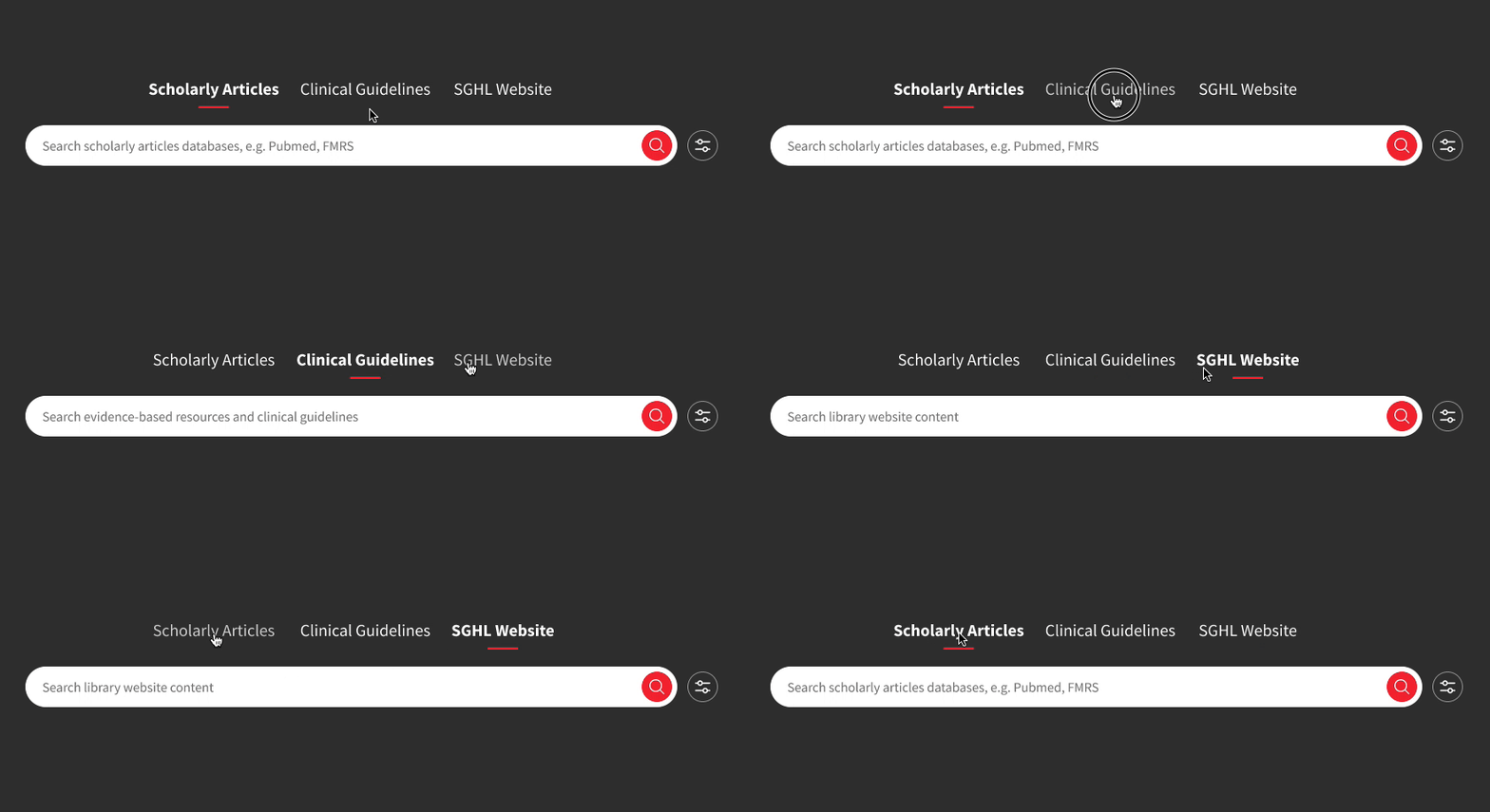
Distinct scopes for distinct information needs
The vertical search scopes help users distinctly search scholarly articles for academic research, search guidelines for clinical practice, and search SGHL website for library
Simple search for simple concepts
For most users and most time, features like query auto-suggest facilitate seamless queries for a quick search seeking simple medical concepts.

Advanced search for precise queries
The advanced search with guided style query input gives experienced researchers complete control of boolean operators and syntax for them to create a more targeted search on complex research topics

Scannable and informative result page
A clear layout and visual design allow users to quickly scan, digest and make decisions.

Effective filtering & sorting
The filtering & sorting options contain the search criteria that match user expectations and are located on top of the result page for easier access.

Article card with clear information hierarchy
With an understanding of what information users need the most for evaluating search results, I selected and organized metadata on article cards aiming for clear information hierarchy and simplicity.

Impact
With satisfying usability and boosted efficiency in literature retrieval, users are pleased with the new search feature
72%
reduction in avg. search time per query
68%
MAU physicians adopted consolidated search (≥3 sessions within 60 days)
83
usability testing score received
Let’s Connect!
© 2025 Yiqing Wang
Work

Resume

About
Unified Search Across 80+ Medical Databases
Designing one search experience for researchers and clinicians whose different goals require different paths to finding information.
Timeline
2023, 3-month
My Role
Lead designer on end-to-end search workflow
Team
12-person CFN team
Why it matters
80+ databases, 1 search
Consolidated dozens of separate databases into a unified query experience — adopted as a repeat workflow by 68% of monthly active physicians.
72% faster retrieval
Cut query time by 72% for 3,000+ physicians and researchers — turning fragmented literature search process into a single-step workflow.
Problem
The 3rd party literature databases all have poorly functioned search. It’s extremely time consuming for physician to access multiple external databases every time they need to search a topic
Solution Overview
A streamlined search function consolidates subscribed literature databases, enabling clinicians to quickly find highly relevant medical documents from a single point of entry
My Contribution
User research and usability testing
Conducted usability testing, user interview and query analysis to refine query builder, filters, and result layouts.

Cross-functional team partnership
Partnered with PMs and engineers to prioritize features and optimize search logic within technical and data constraints.

Interaction design & IA
Led interaction and information architecture design for a unified medical literature search experience.

Design system development
Collaborated with design and engineering teams to create a design system.
Discovery
Existing Product Gaps
- Fragmented experience jumping across platforms
- Various unintuitive search tools
Through remote testing, interviews, and query analysis, I synthesized insights with journey mapping to help the team understand users’ search behavior and pain points
User Goal
The user research also helped me identified 2 personas: clinicians and researchers, along with their different behaviors and shared needs
Design Goal
- Streamline the search flow from selecting scope, entering query, to fine-tuning results.
- Accommodate both simple and complex search tasks
Design Process
Brainstorm & Prioritization
With clear design goals in mind, I facilitated a brainstorm session with my team, sketched ideas and voted the key features to develop
Wireframe Iteration: Search Result Page
Determining the most effective result layout and filter strategy for fast information discovery
Starting from unvalidated concepts generated during brainstorming, I prototyped 3 options to compare their impact on result scanability and filter accessibility.
Option 1
Sidebar filters improve visibility of search criteria, but increase vertical scrolling, creating friction during browsing.
Option 2 Won
The winning option takes up less vertical space, and shows the most popular filters upfront, making it easier for the user to notice and access
Option 3
Hiding filters under an “All Filters” button reduces clutter but adds an extra click in a flow where users apply filters almost every time.
Hi-fi Detail: Article Card
Article card iterations progressively reduced complexity to support faster scanning and clearer hierarchy
Iteration 1
Initial article card design included dense metadata, which proved too detailed for browsing.
Final Version with refined information hierarchy
The final design prioritizes essential information, constrains text width to improve readability, and uses visual hierarchy to emphasize the most important content.
Final Design
Distinct scopes for distinct information needs
The vertical search scopes help users distinctly search scholarly articles for academic research, search guidelines for clinical practice, and search SGHL website for library
Simple search for simple concepts
For most users and most time, features like query auto-suggest facilitate seamless queries for a quick search seeking simple medical concepts.
Advanced search for precise queries
The advanced search with guided style query input gives experienced researchers complete control of boolean operators and syntax for them to create a more targeted search on complex research topics
Scannable and informative result page
A clear layout and visual design allow users to quickly scan, digest and make decisions.
Effective filtering & sorting
The filtering & sorting options contain the search criteria that match user expectations and are located on top of the result page for easier access.
Article card with clear information hierarchy
With an understanding of what information users need the most for evaluating search results, I selected and organized metadata on article cards aiming for clear information hierarchy and simplicity.
Impact
With satisfying usability and boosted efficiency in literature retrieval, users are pleased with the new search feature
72%
reduction in avg. search time per query
68%
MAU physicians adopted consolidated search (≥3 sessions within 60 days)
83
usability testing score received
Let’s Connect!
© 2026 Yiqing Wang
Work
Resume
About
Unified Search Across 80+ Medical Databases
Designing one search experience for researchers and clinicians whose different goals require different paths to finding information.
Timeline
2023, 3-month
My Role
Lead designer on end-to-end search workflow
Team
12-person CFN team
Why it matters
80+ databases, 1 search
Consolidated dozens of separate databases into a unified query experience — adopted as a repeat workflow by 68% of monthly active physicians.
72% faster retrieval
Cut query time by 72% for 3,000+ physicians and researchers — turning fragmented literature search process into a single-step workflow.
Problem
The 3rd party literature databases all have poorly functioned search. It’s extremely time consuming for physician to access multiple external databases every time they need to search a topic
Solution Overview
A streamlined search function consolidates subscribed literature databases, enabling clinicians to quickly find highly relevant medical documents from a single point of entry
My Contribution
User research and usability testing
Conducted usability testing, user interview and query analysis to refine query builder, filters, and result layouts.

Cross-functional team partnership
Partnered with PMs and engineers to prioritize features and optimize search logic within technical and data constraints.

Interaction design & IA
Led interaction and information architecture design for a unified medical literature search experience.

Design system development
Collaborated with design and engineering teams to create a design system.
Discovery
Existing Product Gaps
- Fragmented experience jumping across platforms
- Various unintuitive search tools
Through remote testing, interviews, and query analysis, I synthesized insights with journey mapping to help the team understand users’ search behavior and pain points
User Goal
The user research also helped me identified 2 personas: clinicians and researchers, along with their different behaviors and shared needs
Design Goal
- Streamline the search flow from selecting scope, entering query, to fine-tuning results.
- Accommodate both simple and complex search tasks
Design Process
Brainstorm & Prioritization
With clear design goals in mind, I facilitated a brainstorm session with my team, sketched ideas and voted the key features to develop
Wireframe Iteration: Search Result Page
Determining the most effective result layout and filter strategy for fast information discovery
I prototyped 3 options to compare effectiveness on result scanability and filter accessibility.
Option 1
Sidebar filters improve visibility of search criteria, but increase vertical scrolling, creating friction during browsing.
Option 2 Won
The winning option takes up less vertical space, and shows the most popular filters upfront, making it easier for the user to notice and access
Option 3
Hiding filters under an “All Filters” button reduces clutter but adds an extra click in a flow where users apply filters almost every time.
Hi-fi Detail: Article Card
Article card iterations progressively reduced complexity to support faster scanning and clearer hierarchy
Iteration 1
Initial article card design included dense metadata, which proved too detailed for browsing.
Final Version with refined information hierarchy
The final design prioritizes essential information, constrains text width to improve readability, and uses visual hierarchy to emphasize the most important content.
Final Design
Distinct scopes for distinct information needs
The vertical search scopes help users distinctly search scholarly articles for academic research, search guidelines for clinical practice, and search SGHL website for library
Simple search for simple concepts
For most users and most time, features like query auto-suggest facilitate seamless queries for a quick search seeking simple medical concepts.
Advanced search for precise queries
The advanced search with guided style query input gives experienced researchers complete control of boolean operators and syntax for them to create a more targeted search on complex research topics
Scannable and informative result page
A clear layout and visual design allow users to quickly scan, digest and make decisions.
Effective filtering & sorting
The filtering & sorting options contain the search criteria that match user expectations and are located on top of the result page for easier access.
Article card with clear information hierarchy
With an understanding of what information users need the most for evaluating search results, I selected and organized metadata on article cards aiming for clear information hierarchy and simplicity.
Impact
With satisfying usability and boosted efficiency in literature retrieval, users are pleased with the new search feature
72%
reduction in avg. search time per query
68%
MAU physicians adopted consolidated search (≥3 sessions within 60 days)
83
usability testing score received
Let’s Connect!
© 2026 Yiqing Wang